CCST Networking fundamentals:
Introduction | The Foundation of Networking Knowledge
Networking is the invisible backbone of the digital world. From connecting your smartphone to Wi-Fi to powering global cloud infrastructures, networking is what makes modern communication possible.
For anyone preparing for the Cisco Certified Support Technician (CCST) Networking Certification, understanding the fundamental conceptual building blocks of networks is the first and most critical step.
This guide will help you deeply understand networking concepts like:
- What a network is and how it works
- The OSI and TCP/IP models
- IP addressing and subnetting
- Switching and routing fundamentals
- Wireless networking
- Security basics
- Network troubleshooting
By mastering these topics, you’ll not only pass the CCST Networking exam but also build a solid foundation for advanced Cisco certifications like CCNA.
🖥️ 1. What is Networking?

Definition
Networking is the practice of connecting computers and devices together to share resources like files, printers, and internet access.
A network allows data to travel between devices securely and efficiently — whether inside a small office or across the world.
Key Benefits of Networking
- Resource Sharing: Printers, files, and storage can be accessed by multiple users.
- Communication: Enables email, video calls, and instant messaging.
- Scalability: Easily add new devices without disrupting existing connections.
- Centralized Management: Control and monitor network devices from one location.
Real-World Example
When you stream Netflix or access Google Drive — you’re using multiple interconnected networks built on the same networking principles that the CCST exam focuses on.
🌐 2. Types of Networks
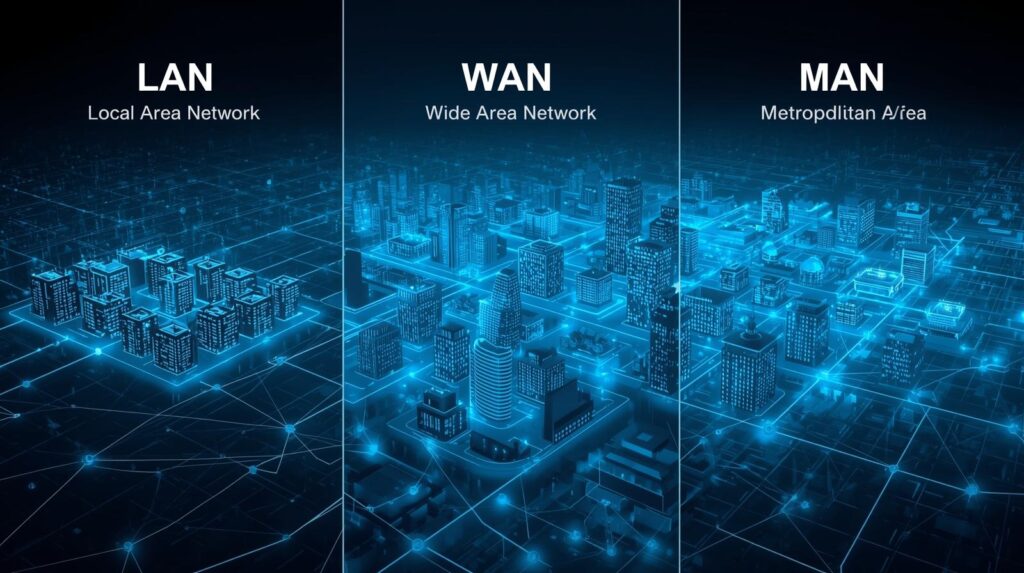
Networking isn’t one-size-fits-all. Depending on size and purpose, networks are categorized into different types:
🔹 LAN (Local Area Network)
Covers a small geographical area like a home, school, or office.
Example: Your home Wi-Fi network.
🔹 WAN (Wide Area Network)
Connects multiple LANs over large distances.
Example: The Internet itself.
🔹 MAN (Metropolitan Area Network)
Covers a city or large campus.
Example: City-wide broadband services.
🔹 PAN (Personal Area Network)
Connects personal devices within a few meters.
Example: Bluetooth between a phone and headphones.
🔹 CAN (Campus Area Network)
Used in universities or corporate campuses to interconnect several buildings.
Understanding these helps you recognize network scope — a key exam concept in CCST Networking.
🧠 3. Network Devices: The Building Blocks
Every network consists of several core devices that perform specific functions. Let’s understand each:
🖧 1. Router
- Connects multiple networks (like LAN to the Internet)
- Routes data packets based on IP addresses
- Works on Layer 3 of the OSI Model (Network Layer)
🔀 2. Switch
- Connects multiple devices within a LAN
- Uses MAC addresses to forward data efficiently
- Operates at Layer 2 (Data Link Layer)
🌍 3. Access Point (AP)
- Connects wireless devices to a wired network
- Extends network coverage via Wi-Fi signals
💻 4. Hub
- Broadcasts data to all connected devices (less secure and outdated)
- Operates at Layer 1 (Physical Layer)
🧱 5. Firewall
- Monitors and controls network traffic
- Protects against unauthorized access and cyber threats
🧩 6. Modem
- Converts digital signals to analog and vice versa for Internet access
Each of these devices plays a key role in creating a stable and secure network — exactly what you’ll be tested on in the CCST Networking Certification.
🧬 4. OSI and TCP/IP Models
To truly understand how data travels across networks, you must master the OSI (Open Systems Interconnection) and TCP/IP models.
🧱 OSI Model (7 Layers)
- Physical Layer: Cables, signals, ports (actual hardware)
- Data Link Layer: MAC addresses, switches, frames
- Network Layer: IP addresses, routers, packets
- Transport Layer: TCP/UDP communication, ports
- Session Layer: Establishes and maintains sessions
- Presentation Layer: Data formatting, encryption, compression
- Application Layer: End-user services like HTTP, FTP, SMTP
🌐 TCP/IP Model (4 Layers)
- Network Interface Layer
- Internet Layer
- Transport Layer
- Application Layer
The OSI model is conceptual, while TCP/IP is practical. For CCST Networking, focus on identifying which layer handles what, and how data encapsulation works during transmission.
🔢 5. IP Addressing and Subnetting
🧮 What is an IP Address?
An IP address identifies a device on a network — just like a postal address identifies your home.
Two main versions:
- IPv4: 32-bit (e.g., 192.168.1.1)
- IPv6: 128-bit (e.g., 2001:0db8:85a3::8a2e:0370:7334)
📚 Private vs. Public IP
- Private IPs: Used within internal networks (e.g., 192.168.x.x)
- Public IPs: Used on the Internet, assigned by ISPs
🧩 Subnetting
Subnetting divides a large network into smaller ones for better efficiency and security.
Example: Splitting 192.168.1.0/24 into smaller subnets like 192.168.1.0/26.
📊 Subnet Mask
Defines how much of an IP address belongs to the network portion.
For example:
- /24 = 255.255.255.0
- /26 = 255.255.255.192
Understanding subnetting is vital for network design and is a common CCST exam topic.
⚙️ 6. Switching and Routing Fundamentals
🔀 Switching
Switches operate at Layer 2 and use MAC addresses to forward frames only to the intended device.
They prevent unnecessary traffic and increase network speed.
🌍 Routing
Routers work at Layer 3 and use IP addresses to send packets between networks.
Types of Routing:
- Static Routing: Manually configured by the admin
- Dynamic Routing: Automatically updated using routing protocols like RIP, OSPF, EIGRP
📡 VLAN (Virtual LAN)
A VLAN separates network traffic logically within the same switch.
Example: HR and Finance can use the same switch but remain isolated for security.
Switching and routing concepts are central to networking — expect several CCST questions on them.
📶 7. Wireless Networking Basics
Wireless networking allows devices to communicate without cables.
🌐 Wi-Fi Standards
|
Standard |
Frequency |
Speed |
|
802.11b |
2.4 GHz |
11 Mbps |
|
802.11g |
2.4 GHz |
54 Mbps |
|
802.11n |
2.4/5 GHz |
600 Mbps |
|
802.11ac |
5 GHz |
1 Gbps+ |
|
802.11ax (Wi-Fi 6) |
2.4/5 GHz |
10 Gbps |
📡 Common Wireless Terms
- SSID: Network name
- Encryption: WPA2/WPA3 for security
- Access Point (AP): Connects wireless clients to wired LAN
Wireless knowledge is essential for CCST and real-world support roles.
🔐 8. Network Security Fundamentals
Network security ensures data integrity and protects against unauthorized access.
🔸 Key Security Concepts
- Confidentiality: Protecting data from unauthorized access
- Integrity: Ensuring data is not altered in transit
- Availability: Ensuring network services are always accessible (CIA Triad)
🔸 Security Mechanisms
- Firewalls: Block suspicious traffic
- VPNs (Virtual Private Networks): Encrypt traffic for remote access
- IDS/IPS: Detect and prevent intrusions
- Authentication: Using usernames, passwords, or multi-factor login
- Encryption: Secures data during transmission (e.g., HTTPS, SSL)
Security is an important CCST domain — Cisco expects you to understand how these tools protect data flow.
🧰 9. Network Troubleshooting Fundamentals
Every network engineer must be a good troubleshooter.
For CCST, Cisco emphasizes structured problem-solving.
⚡ Common Troubleshooting Tools
- Ping: Checks connectivity
- Traceroute: Shows the path packets take
- IPConfig / IFConfig: Displays IP configuration
- NSLookup: DNS resolution checks
- Wireshark: Packet analysis tool
🧭 Troubleshooting Steps
- Identify the problem
- Gather information
- Establish a theory
- Test the theory
- Implement a solution
- Verify full system functionality
- Document findings
A logical approach to troubleshooting saves time and improves reliability — key skills for a CCST-certified professional.
🏗️ 10. The Importance of Network Topologies
Network topology defines how devices are connected.
📈 Common Topologies
- Star: Devices connect to a central switch (most common)
- Bus: All devices share one communication line
- Ring: Each device connects to two others (data travels in a loop)
- Mesh: Every device connects to all others (used in large, fault-tolerant networks)
Star topology dominates modern LANs because it’s scalable and easy to troubleshoot.
🌍 11. Network Protocols You Must Know
Protocols are communication rules for data transfer.
📚 Common Networking Protocols
|
Protocol |
Function |
|
HTTP/HTTPS |
Web browsing |
|
FTP/SFTP |
File transfer |
|
SMTP/POP3/IMAP |
Email communication |
|
DNS |
Domain name resolution |
|
DHCP |
Assigns IP addresses automatically |
|
SNMP |
Network management and monitoring |
|
SSH/Telnet |
Remote device access |
Understanding these is vital for identifying network issues and ensuring smooth communication between systems.
🎯 12. How to Prepare for the CCST Networking Certification
📘 Study Tips
- Learn the OSI and TCP/IP models deeply.
- Practice with real or simulated labs (Cisco Packet Tracer is perfect).
- Understand IP addressing and subnetting through exercises.
- Review Cisco networking device configurations.
- Focus on security, protocols, and troubleshooting.
🧠 Recommended Resources
- Cisco Learning Network
- Cisco Networking Academy (NetAcad)
- CCST Official Study Guide
- YouTube Channels: Jeremy’s IT Lab, NetworkChuck
💡 13. Why CCST Networking Certification Matters
The Cisco Certified Support Technician (CCST) validates foundational networking knowledge and is perfect for:
- Entry-level IT professionals
- Aspiring network engineers
- Students aiming for CCNA or CompTIA Network+ later
Career Benefits:
- Recognized globally by employers
- Builds a solid base for advanced Cisco certifications
- Improves problem-solving and troubleshooting skills
- Increases earning potential
🧭 14. Real-World Application of Networking Concepts
After CCST, you’ll apply these principles in roles like:
- Network Support Technician
- IT Helpdesk Engineer
- Junior Network Administrator
Your tasks may include configuring switches and routers, setting up wireless access, managing IP addresses, or troubleshooting connectivity.
Understanding networking at the conceptual and practical level transforms theory into real-world IT success.
FAQs on CCST Networking Fundamentals
Q1. What is the CCST Networking Certification?
It’s an entry-level Cisco certification focusing on networking basics, designed for beginners or IT support professionals.
Q2. How long should I study for the CCST exam?
Around 4–6 weeks of consistent study (2 hours/day) is ideal.
Q3. What tools can I use for practice?
Cisco Packet Tracer, Wireshark, and real routers/switches if available.
Q4. Does CCST expire?
Yes, CCST certifications are valid for 3 years.
Q5. Is CCST better than CompTIA Network+?
Both are excellent. CCST focuses on Cisco technologies and networking fundamentals, while Network+ covers vendor-neutral concepts.
🌟 Conclusion: Building a Future in Networking
The fundamental conceptual building blocks of networks form the backbone of every IT system on Earth. Whether you’re setting up a small office Wi-Fi or supporting enterprise infrastructure, understanding these basics is your gateway to success.
The CCST Networking certification is your first step toward mastering this world — and a powerful launchpad for your IT career.
So, start your journey today.
Study smart, practice consistently, and subscribe for more CCST preparation guides and networking tips!